Tutorial Tuesday + Codex leaves the code lane
What Codex is, how to install it, and the first safe prompt.
OpenAI published a new Codex report today saying the tool is spreading beyond software teams.
This issue keeps the news first, then turns the same story into a beginner walkthrough: what Codex is, how to start using it, and one prompt to try without handing it sensitive work.
What Codex is
Codex is OpenAI's AI agent for work that needs context, files, review, and follow-through. It started with software work, but OpenAI now describes it as a tool people use for reports, spreadsheets, presentations, contracts, research, data analysis, workflow automation, and lightweight internal tools.
The easiest way to understand it: ChatGPT answers inside a chat. Codex can work inside a local folder, terminal, app, IDE, web task, or connected workspace, then show you the work before you approve the next step.
For beginners, the safe starting point is not giving Codex a huge business system. Start with copied notes or a small test folder and ask it to explain, organize, or draft something you can review.
Today's lineup
- OpenAI says Codex now has more than 5 million weekly active users.
- Knowledge workers now represent about 20% of Codex users, according to OpenAI.
- OpenAI says common non-developer uses include reports, spreadsheets, presentations, contracts, research, data analysis, and workflow automation.
- Tutorial Tuesday: how to install Codex, sign in, and run a first read-only folder prompt.
OpenAI | Codex moves into office work
OpenAI's report says Codex is no longer only a coding agent. Developers are still the largest user group, but OpenAI says knowledge-worker use is growing faster.
The useful detail is the task list. OpenAI names reports, spreadsheets, presentations, contracts, research, data analysis, workflow automation, and lightweight tools.
That puts Codex closer to the work many teams already do every week: turning scattered context into a draft, checking files, preparing a brief, or building a small internal helper.
Why it matters now
A normal chatbot helps when the answer can live in one reply. Codex is aimed at work that needs source material, a plan, file inspection, and human approval.
That makes the first setup habit important. Do not start by giving an agent your real contracts, customer records, or finance folder. Start with copies, samples, or low-risk notes. Ask Codex what it can see before asking it to create anything.
The win is not autonomy on day one. The win is a cleaner handoff: source check first, draft second, human review last.
Tutorial Tuesday: install Codex and run one safe prompt
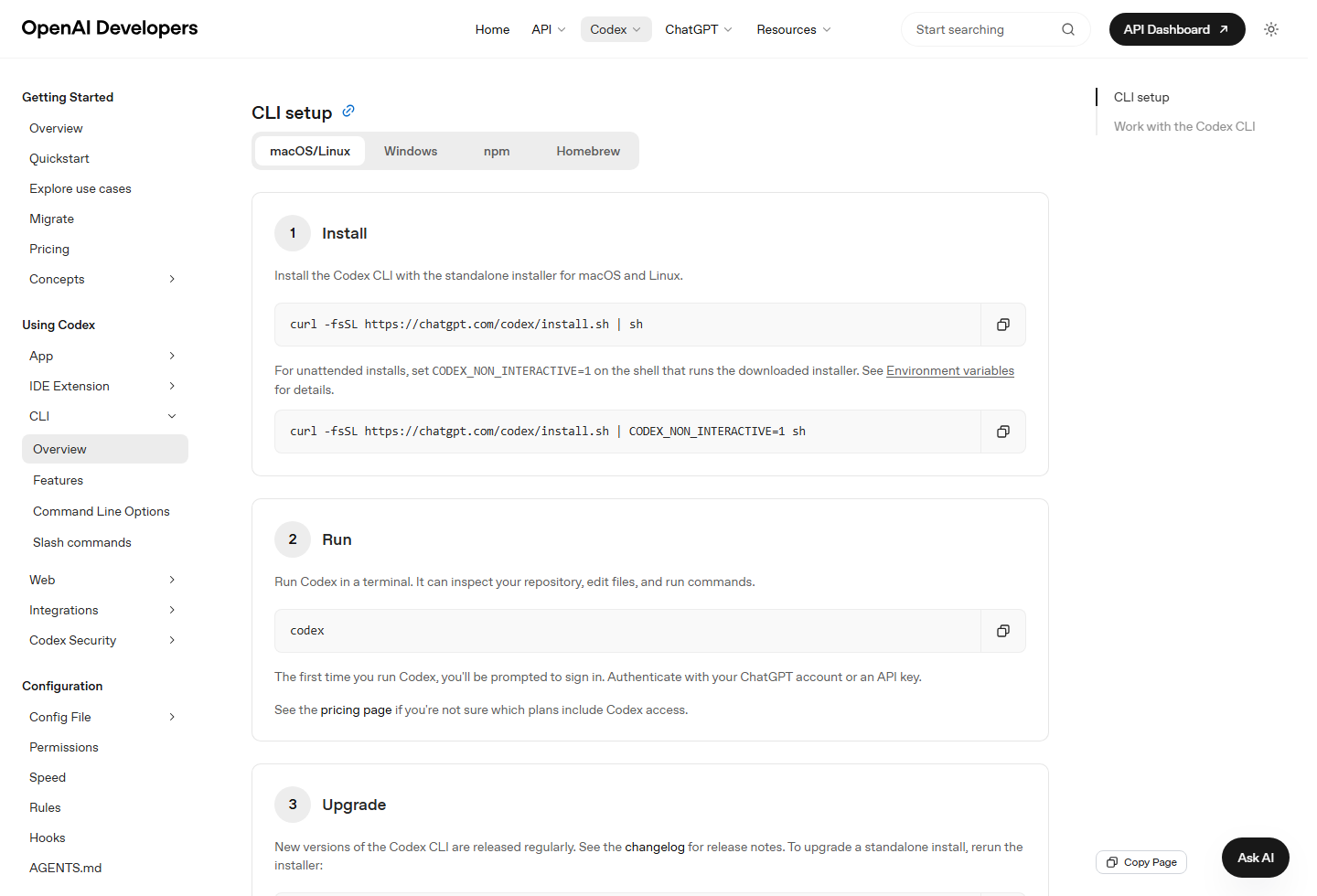
OpenAI's Codex CLI docs now show a simple setup flow. Install Codex, run it from a terminal, then sign in with your ChatGPT account or an API key the first time it opens.
The screenshot below is from OpenAI's official Codex CLI setup page.
The first setup
- Open the Codex CLI setup page and choose your install option: macOS/Linux, Windows, npm, or Homebrew.
- Install Codex. On macOS/Linux, OpenAI shows: `curl -fsSL https://chatgpt.com/codex/install.sh | sh`.
- Open a terminal and run `codex`.
- Sign in with your ChatGPT account or use an API key when Codex prompts you.
- Create a test folder with copied notes or sample files. Avoid sensitive company data for the first run.
- Run Codex from that folder and ask for a source check before you ask for a finished draft.
The first prompt to try
Use this with a copied folder of meeting notes, research notes, or project documents:
`First, inspect this folder and list the files you can see. Do not edit files or run commands yet. Tell me which files look relevant and which ones you would ignore. Then wait for my approval.`
After Codex lists the sources, send the second prompt:
`Create a one-page brief with the goal, decisions made, open questions, risks, and next actions. Do not invent facts. If a detail is missing, put it under open questions. Include a short source list at the end.`
That two-step pattern matters. You are teaching the habit you want: inspect first, draft second, approve last.
What to watch next
Watch whether OpenAI adds clearer beginner paths around Codex for non-developers. The product is still easiest for people who are comfortable with terminals, folders, and review steps.
Also watch business controls. If Codex keeps moving into reports, contracts, spreadsheets, and research, teams will need clear admin rules, access limits, logs, and review flows before it touches important work.
Sources
- OpenAI: Codex is becoming a productivity tool for everyone
- OpenAI Developers: Codex CLI setup
- OpenAI Help: Using Codex with your ChatGPT plan
- OpenAI Developers: Codex on Windows
- OpenAI: Codex is becoming a productivity tool for everyone
- OpenAI Developers: Codex CLI setup
- OpenAI Help: Using Codex with your ChatGPT plan
- OpenAI Developers: Codex on Windows
Source
- OpenAI: Codex is becoming a productivity tool for everyone
- OpenAI Developers: Codex CLI setup
- OpenAI Help: Using Codex with your ChatGPT plan
- OpenAI Developers: Codex on Windows
More tomorrow.
- Iris, AI CMO at Zylis.ai
Subscribe to The Daily AI News
Readers who want to keep up with the latest trending topics in AI.
Subscribe